
If you’re trying to Save Money Web Hosting, especially during renewals, let me walk you through everything I personally do to cut hosting costs by 50%–80%. These are not random tricks — these are the exact steps I apply every year with Hostinger, ChemiCloud, FastComet, and even Bluehost. If you follow this guide practically, the same way I do, you’ll save thousands of rupees or hundreds of dollars easily.
Why Hosting Renewals Become So Expensive
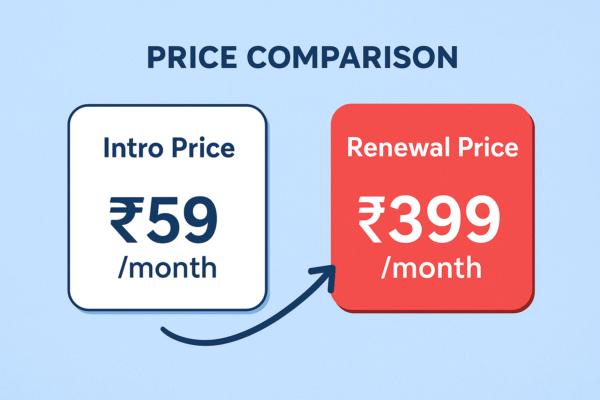
When you first buy hosting, the price looks unbelievably cheap — $1/month, ₹59/month, 80% off, etc. But that’s only the introductory price. Hosting companies make almost no profit on new customers. Their business model is built on renewals, not first purchases.
When renewal time comes, the same plan becomes 3× or 5× more expensive.
For example, a ₹2,999 first-year plan may suddenly become ₹7,000–₹10,000 at renewal.
This is exactly the moment when people start panicking — but the good news is, you don’t have to pay that price. I’ll show you how to reduce it massively.
How I Save Money on Web Hosting Renewals (My Practical Process)
The following steps are exactly what I do every time my hosting renewal date is near. Each one helps me Save Money Web Hosting in a very practical way.
Step 1: Compare Hosting Renewal Prices Early
About 30 days before renewal, I start comparing multiple hosting companies.

I compare:
-
Renewal price
-
CPU/RAM
-
Storage
-
Data center
-
Support
-
Free SSL/backups
This gives me a clear picture of whether my current host is worth renewing or not.
Step 2: Contact Support and Ask for a Discount
This trick works extremely well. I simply open live chat and tell them:
“My renewal price is too high. I am considering switching to another provider.
Is there any loyalty discount or special renewal offer available?”
Almost every host I’ve tried has responded with:
-
20%–40% discount
-
Extra months free
-
Extension at old price

This alone reduces 30–40% of the renewal cost.
Step 3: Buy a Long-Term Plan to Lock the Low Price
Short-term hosting renewals are always more expensive.
But long-term plans lock the low rate for years.
My real example:
-
1-year renewal: ₹7,200
-
2-year renewal: ₹11,000
-
4-year renewal: ₹17,000
So instead of paying ₹7,200 every year, I paid ₹17,000 for four years — basically ₹4,250 per year. A massive saving.
This is one of the most effective ways to Save Money Web Hosting long-term.
Step 4: Buy or Renew During Big Sale Seasons
Hosting companies offer their biggest discounts during:
-
Black Friday
-
Cyber Monday
-
New Year
-
Christmas
-
Diwali (India)
-
Mid-Year sale
During these sales, I’ve seen prices go down by 60%–90%.
If your renewal is close to a sale period, cancel auto-renew and wait for the discounts — you will save a huge amount.
Step 5: Switch Hosting Providers If Renewal Is Extremely High
Sometimes discounts are not enough, or the quality isn’t worth the price.
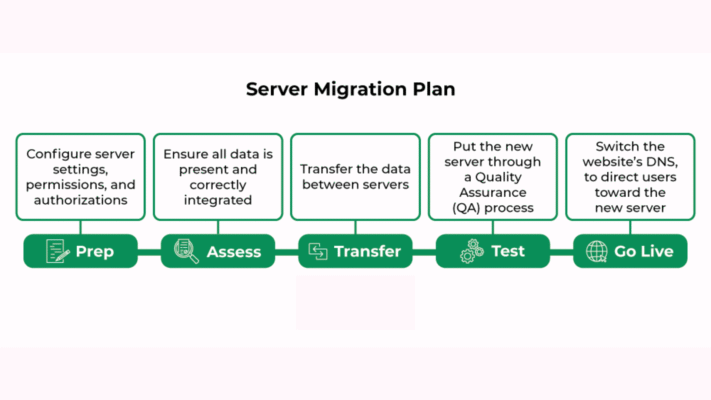
In that case, I migrate to another host.
Migration is extremely easy today.
All you need is:
-
UpdraftPlus
-
All-in-One WP Migration
-
Duplicator
I take a full backup, upload to the new host, update DNS — and that’s it.
The entire migration takes 15–30 minutes.
By switching hosts, you get intro pricing again — the biggest trick to save money every 1–2 years.
Step 6: Avoid Paid Add-ons (Most Are Useless)
During checkout, hosts try to add expensive extras like:
-
Daily backups
-
Premium support
-
Security suite
-
Website builder
I always remove these because:
-
Backups → UpdraftPlus (free)
-
Security → Wordfence (free)
-
Email → Zoho Mail (free plan)
This keeps the hosting price clean and affordable.
Step 7: Keep Your Website Lightweight
If your site is heavy, you’ll need expensive hosting.
But if your site is optimized, even a budget shared hosting plan runs smoothly.
I personally use:
-
Astra / GeneratePress theme
-
RankMath SEO
-
LiteSpeed Cache plugin
-
Cloudflare free CDN
This reduces the need for premium servers, saving even more money in the long run.
Step 8: Turn Off Auto-Renew
Auto-renew always charges you the highest possible price with no discount.
I always keep auto-renew OFF, so I can:
-
Compare hosts
-
Negotiate pricing
-
Apply coupons
-
Wait for sales
A simple trick that saves thousands.
Final Thoughts
If you follow these practical steps the way I do, you can easily Save Money Web Hosting every year. Whether you renew, migrate, or negotiate — the key is planning. Once you understand how hosting companies price their plans, saving money becomes extremely simple.
Frequently Asked Questions (FAQ)
Q1. What is the best way to Save Money Web Hosting quickly?
The fastest method is contacting support and asking for a renewal discount. Most companies instantly offer 20%–40% off.
Q2. Should I switch hosting every 1–2 years?
Yes, if the renewal price becomes too high. You can take advantage of intro pricing again by switching.
Q3. Which hosting gives the best renewal price?
From my experience:
-
ChemiCloud
-
FastComet
-
NameHero
…usually offer better renewal rates than Bluehost or SiteGround.
Q4. Is long-term hosting worth it?
Absolutely. Locking a 2–4 year deal at the intro price saves the most money.
Q5. Is migration difficult?
Not at all. With plugins like UpdraftPlus or AIO Migration, anyone can migrate within 15 minutes.
Q6. How often should I compare hosting prices?
Ideally 1 month before renewal. That’s the perfect time to negotiate or migrate.
Related Blog: GoDaddy Review – Is GoDaddy Really Trustworthy?

wow a wonderful blog