
Why Android Phone Overheating Is a Serious Problem
Android phone overheating is no longer a rare issue—it has become one of the most common smartphone problems faced by users worldwide. From budget Android devices to flagship smartphones, overheating can affect performance, battery life, user safety, and even long-term hardware durability. When a phone overheats, it does not just feel uncomfortable in your hand; it silently damages internal components, reduces battery health, and increases the risk of sudden shutdowns or permanent failure.
Many users assume that phone heating is “normal,” especially during gaming or charging. However, consistent or excessive Android phone overheating is a clear sign that something is going wrong beneath the surface. Modern Android devices are designed with thermal management systems, meaning if your phone is heating up frequently, it indicates a software, hardware, or environmental issue that needs attention.
In this in-depth professional guide, we will break down exact causes, research-verified diagnostic methods, and long-term solutions for Android phone overheating. We will also explore 10 advanced research and monitoring tools that experts use to analyze heat patterns and prevent damage. Every section is written to help readers understand what is happening, why it is happening, and how to fix it permanently.
What Is Android Phone Overheating? (Technical Explanation)
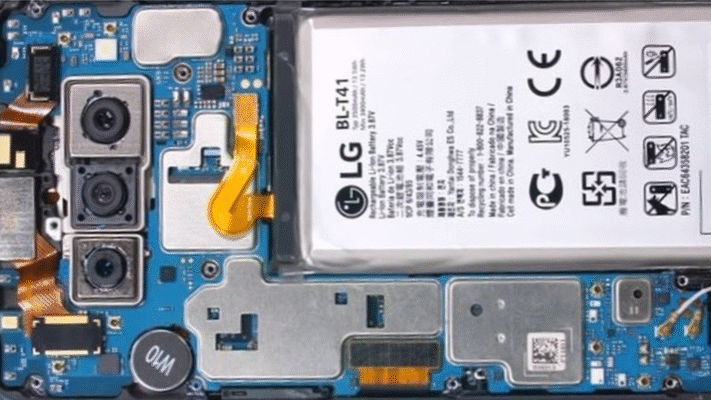
Android phone overheating occurs when the internal temperature of the device rises beyond its safe operating range, usually above 40–45°C (104–113°F) during normal use. When temperatures exceed 50°C, Android automatically triggers thermal throttling, which slows down performance to prevent damage.
Heat is generated mainly by:
-
CPU (Processor)
-
GPU (Graphics Processor)
-
Battery
-
Charging circuits
-
Network modules (5G, Wi-Fi, Bluetooth)
When heat generation becomes faster than heat dissipation, the device temperature rises uncontrollably. Over time, this repeated overheating weakens internal solder joints, degrades lithium-ion batteries, and reduces the lifespan of the smartphone.
Top Causes of Android Phone Overheating (Deep Analysis)
1. High CPU Usage from Background Apps
One of the most common Android overheating causes is excessive CPU usage triggered by background applications. Many apps continue running even when not actively used—syncing data, tracking location, or sending notifications. Poorly optimized apps consume processor power continuously, generating unnecessary heat.
Apps related to:
-
Live wallpapers
-
Third-party launchers
can push the CPU to operate at higher clock speeds for extended periods. This constant workload leads to rapid temperature buildup, especially on mid-range devices with limited thermal management.
2. Heavy Gaming and Graphics-Intensive Tasks
Modern Android games are designed with console-level graphics, which place extreme pressure on both CPU and GPU. When users play games like PUBG, Call of Duty Mobile, or Genshin Impact for long sessions, the phone’s GPU generates massive heat.
Additionally, if the game is not optimized for your device chipset, it forces the processor to overwork, increasing heat output exponentially. This is one of the most visible Android phone overheating scenarios.
3. Fast Charging and Poor-Quality Chargers
Fast charging is convenient but also one of the biggest contributors to Android overheating. High wattage charging generates heat inside the battery and charging IC. Using:
-
Cheap cables
-
Non-certified adapters
-
Damaged charging ports
further increases resistance, causing excessive heat buildup. Charging your phone while using it for gaming or video streaming multiplies the thermal stress.
4. Weak Network Signals and 5G Usage
When your Android phone struggles to maintain a network connection, it continuously boosts antenna power to search for signals. This is extremely common in:
-
Poor coverage areas
-
Elevators
-
Underground locations
5G networks, while faster, require more power, especially when signal strength fluctuates. Continuous signal hunting leads to overheating without the user realizing the cause.
5. Environmental Heat and Direct Sunlight
Using your Android phone in direct sunlight or hot environments dramatically increases internal temperatures. Smartphones rely on passive cooling, meaning they release heat into surrounding air. When ambient temperature is already high, heat dissipation becomes inefficient.
This is why phones often overheat during:
-
Summer travel
-
Outdoor navigation
-
Dashboard placement in cars
6. Malware, Spyware, and Hidden Processes
Malicious apps can secretly run background processes, mine data, or abuse CPU resources. Many users experience Android phone overheating without visible heavy usage, which is often a sign of malware infection.
7. Aging Battery and Hardware Degradation
As lithium-ion batteries age, their internal resistance increases. This leads to more heat generation during charging and usage. An old battery is a silent but powerful contributor to overheating issues.
10 Research Tools to Diagnose Android Phone Overheating (Expert-Level)
| Tool Name | Purpose | Best For |
|---|---|---|
| CPU-Z | Real-time CPU & battery temperature | Hardware diagnostics |
| AccuBattery | Battery health & thermal data | Battery analysis |
| GSAM Battery Monitor | App-level heat usage | Background app detection |
| DevCheck | System temperature sensors | Advanced monitoring |
| Trepn Profiler | CPU performance tracking | Developers |
| Thermal Guardian | Heat alert system | Overheat prevention |
| AIDA64 | Sensor-level thermal data | Professional diagnostics |
| Android Profiler | System resource usage | Developers & testers |
| Malwarebytes | Malware heat causes | Security analysis |
| Logcat Viewer | Kernel thermal logs | Advanced users |
Proven Solutions to Fix Android Phone Overheating Permanently
Optimize App Usage and Background Processes
Disabling unnecessary background apps dramatically reduces CPU load. Use battery optimization settings and restrict apps that do not need constant activity.
Reduce Screen Brightness and Refresh Rate
High brightness and 120Hz refresh rates generate additional heat. Adaptive brightness and standard refresh settings significantly lower thermal stress.
Use Certified Chargers Only
Always use manufacturer-approved chargers. Avoid charging your phone under pillows, beds, or enclosed spaces that trap heat.
Update Software Regularly
Android updates often include thermal optimizations and bug fixes. Outdated firmware can worsen overheating problems.
Avoid Phone Cases During Heavy Usage
Thick cases trap heat. Removing the case during gaming or charging improves airflow and cooling.
What NOT to Do When Your Android Phone Overheats
-
Never put your phone in a refrigerator
-
Do not use cooling sprays
-
Avoid third-party performance booster apps
-
Do not continue charging when phone is hot
These actions may cause moisture damage or internal short circuits.
Long-Term Prevention Tips for Android Phone Overheating
-
Keep storage at least 20% free
-
Replace battery after 2–3 years
-
Avoid multitasking during charging
-
Monitor temperature monthly using research tools
Final Verdict: Is Android Phone Overheating Preventable?
Yes, Android phone overheating is completely preventable when users understand the root causes and take data-driven actions. By combining research tools, smart usage habits, and proper charging practices, users can extend their device lifespan, maintain peak performance, and avoid costly repairs.
A smartphone is an investment—and protecting it from overheating ensures it continues to deliver value for years to come.
Read More: Why Your Android Battery Drains Fast and How to Fix It

very nice article